Chat with Predixsport data
in Claude, Perplexity and ChatGPT
Ask about NBA, Euroleague, football, ATP and WTA predictions in plain language.
You can also use the same private ATP or Euroleague Fantasy workspace you use on the Web.
Setup takes about four minutes. No code.
On your phone? Do the setup on a computer first.
The one-time setup takes about three minutes and has to be done on a computer. Claude only lets you add a connector from claude.ai in a desktop browser (or the Claude desktop app). The iOS and Android apps have no “Add connector” screen, so tapping a Claude link on a phone just opens the app and leaves you stuck.
Good news: you only do this once. After you add Predixsport on a computer, it shows up in Claude on this phone automatically. There is nothing to install here.
On your laptop, open https://www.predixsport.com/mcp-setup
What this is
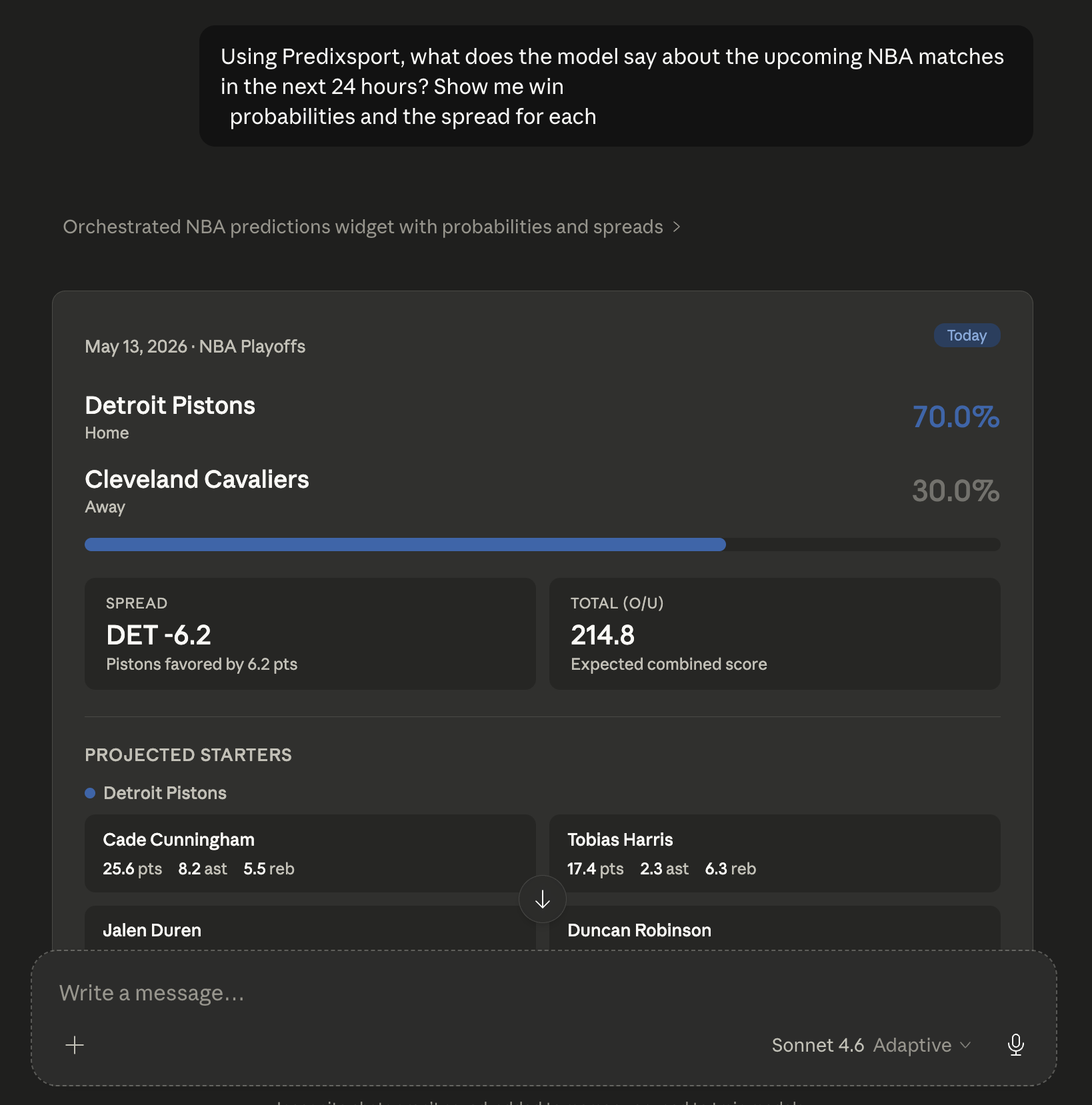
Predixsport ships a remote MCP connector, an integration that lets a supported AI assistant call our prediction models and private owner tools on demand. Once it is connected to your account, you can ask anything you would normally ask of a sports analyst: which matches look interesting this weekend, how confident a forecast is, how a specific model has performed historically. Claude returns answers grounded in our data, not in generic web knowledge.
Every number Claude shows comes from the same neural networks that power predixsport.com. Predictions update daily; calibration is documented and queryable.
What you can ask
Six representative questions, written exactly as you would ask them in chat:
"What Serie A matches this weekend look most interesting? Pick one and explain why."
"Compare Ruud and Khachanov's upcoming match: win probability, total games, tiebreak chance."
"How well-calibrated is your NBA winner model? Can I trust a 70% prediction?"
"Show me Napoli's prediction history over the last month. Anything that stands out?"
"Read my ATP Fantasy roster, run the optimizer and explain the proposed switches before I apply anything."
"Open my Euroleague Fantasy Turn Card and compare the recommendation with the points already settled this Round."
Claude picks the right tool, calls our API, and answers in plain language. You don't pick endpoints, write queries, or parse JSON.
Who this is for
- Sports analytics enthusiasts and quantitative fans: people who care about why a forecast says what it says, and want to interrogate the model rather than just read its output.
- Sports journalists, broadcasters and content creators: faster sourcing of probability-backed angles for previews, recaps and podcasts, with the model's working clearly attributable.
- Fantasy players and data-curious supporters: anyone who wants a deeper read on form, calibration and player projections, or wants to continue a private Fantasy decision from the Web inside a conversation.
The same Fantasy workspace, in conversation
ATP and Euroleague Fantasy use the same owner-private state on the Web, through the REST API and through MCP. Start in one interface and continue in another without copying your roster or losing the latest recommendation.
ATP Fantasy public beta. Read or save your eight-player roster, run the exact transfer optimizer, resume its latest advice and apply it to your saved Predixsport state after confirming official incoming prices. See the ATP Fantasy guide.
Euroleague Fantasy public beta. Read or save your ten-player roster, calculate opening or between-Turn advice when a valid Round board is available, resume it and apply it to your saved Predixsport state. See the Euroleague Turn Card.
Saving and applying always affect your private Predixsport workspace only. Neither workflow submits a roster or transfer to an official fantasy game. Optimization uses the same per-sport hourly allowance on Web and MCP.
Why this and not something else
Reasonable question. We offer three ways to use the same data: the connector below, a REST API for code, and a JSON/CSV download on every match page. Here's how to think about choosing.
Why not just ask Claude to read your website?
You can, and it will sort-of work. The website is rendered for humans: probabilities are rounded to one decimal, distribution charts are images, and the calibration data lives on a different page. Stitching all of that together by parsing HTML and pixels is exactly what browser-based agents do badly. The connector gives Claude the raw probability arrays, the model identifier and the calibration history in one tool call, so it can answer follow-ups the scraping route can't.
Why not just download the JSON or CSV?
The download is a snapshot at the moment you click. NBA inference in particular only runs a few hours before tip-off, so a file you grabbed in the morning may show no matches when predictions actually publish. The connector pulls fresh data on every question. It also opens the door to scheduled prompts (Claude Pro and Max plans), a recurring question that runs on its own without you clicking anything.
How is this different from your REST API?
The connector runs on top of the API. Same endpoints, same data. The API is for code: Python, dashboards, model stacks, automated pipelines. The connector is for people who live inside Claude and don't want to write that integration: no SDK, no rate-limit handler, no JSON parsing. The cost is that you are tied to Claude's interface, which is the point if Claude is already where your other work happens.
What does MCP let me do that nothing else does?
One conversation, multiple data sources. With other MCP servers connected to your Claude account (a fantasy roster source, a personal notes app), you can cross-reference all of them in a single back-and-forth without opening three apps. That is what the protocol was designed for, and it is the part that's awkward with any of the other layers.
Longer take with concrete examples on the blog: Predixsport with Claude: connector, API, or download: which fits you.
Where it works
You set up Predixsport once and it works everywhere you sign in to Claude. Connectors are stored on your Claude account, not on your device: once added (most easily from the web app at claude.ai or the desktop app), they appear automatically on the iOS and Android apps too. There is no separate mobile installation.
You only set up once. Pick web OR desktop (whichever is easier), do it once, and Predixsport propagates to every other Claude client signed in to that account.
| Platform | Can you set up here? | Will it work once added elsewhere? |
|---|---|---|
| Claude on the web (claude.ai) | Yes, easiest and recommended | Yes |
| Claude desktop (macOS & Windows, same procedure) | Yes, equivalent to the web | Yes |
| Claude mobile (iOS & Android) | - (no Add-Connector UI on mobile) | Yes, inherited from your account |
| ChatGPT desktop app | Custom MCP server, Plus plan or above | Yes, desktop only (web and mobile do not pick it up) |
Plans: all Claude subscription tiers can use custom connectors. Anthropic limits the free tier to one custom connector per account. Pro, Max, Team and Enterprise have no documented cap. Plan tiers also differ in Claude's overall usage limits, see claude.com/pricing. Predixsport does not add plan restrictions of its own.
Beyond Claude: the same server runs as a
custom connector in Perplexity on the Pro,
Max and Enterprise plans, and as a
custom MCP server in the ChatGPT desktop app.
It is also listed on
Smithery,
the MCP server directory, handy if your agent framework or IDE
discovers tools through it.
How the flow works
You type a question in Claude. The connector translates it into a call to our prediction service, which returns the data, and Claude composes the natural-language answer. You see only the question and the answer; the steps in between are automatic.
One-time setup: three minutes, three steps
Predixsport uses standard sign-in: there are no API keys to copy. Add the connector in Claude, click Authorize on the Predixsport screen that opens, and you're ready to ask questions.

Add Predixsport as a connector in Claude
Do this once on the web or desktop app: it will then work on all your Claude clients, including mobile, automatically (the connector lives on your Claude account, not on your device). On claude.ai or the Claude desktop app:
- Open Settings → Connectors in the sidebar.
- Click + then Add custom connector.
- Fill in two fields, leaving Advanced settings empty:
-
Name
Predixsport. This is the label Claude will display in the connector list and inside chats. Please keep it as Predixsport so it matches the rest of this guide and our support docs. -
Server URL
https://mcp.predixsport.com/mcp
Click Add. Claude opens a Predixsport sign-in window. The procedure is identical on macOS and Windows desktop apps: same menu name, same fields.
Note on Advanced settings. The OAuth Client ID and OAuth Client Secret fields are optional. Predixsport registers your Claude installation automatically. Leave both empty.
Sign in and authorize on Predixsport
Right after you click Add, Claude opens a window on
predixsport.com:
- If you don't already have a Predixsport account, sign in with Google, the same Google account you use to read articles on predixsport.com. New accounts start on the Free tier (200 calls/month).
- You'll then see a Predixsport Authorize Claude screen listing what Claude can access, including predictions, ratings, performance metrics and any private Fantasy permissions you choose, plus your current monthly quota.
- Click Authorize. The window closes and Claude lists the Predixsport tools it can now call.
Already connected before Fantasy launched? Existing connections remain read-only. Remove Predixsport from the connector list, add it again and approve the ATP and Euroleague Fantasy permissions on the new consent screen. Access is never widened silently.
Doing this on a computer? Good. That's the only place it works. The iOS and Android apps have no “Add connector” screen, so the steps above can't be done from a phone. You don't need to, though: the connector you authorize here on your computer appears in Claude on your phone automatically the next time you open the app, because it travels with your Claude account, not your device.
Start asking questions
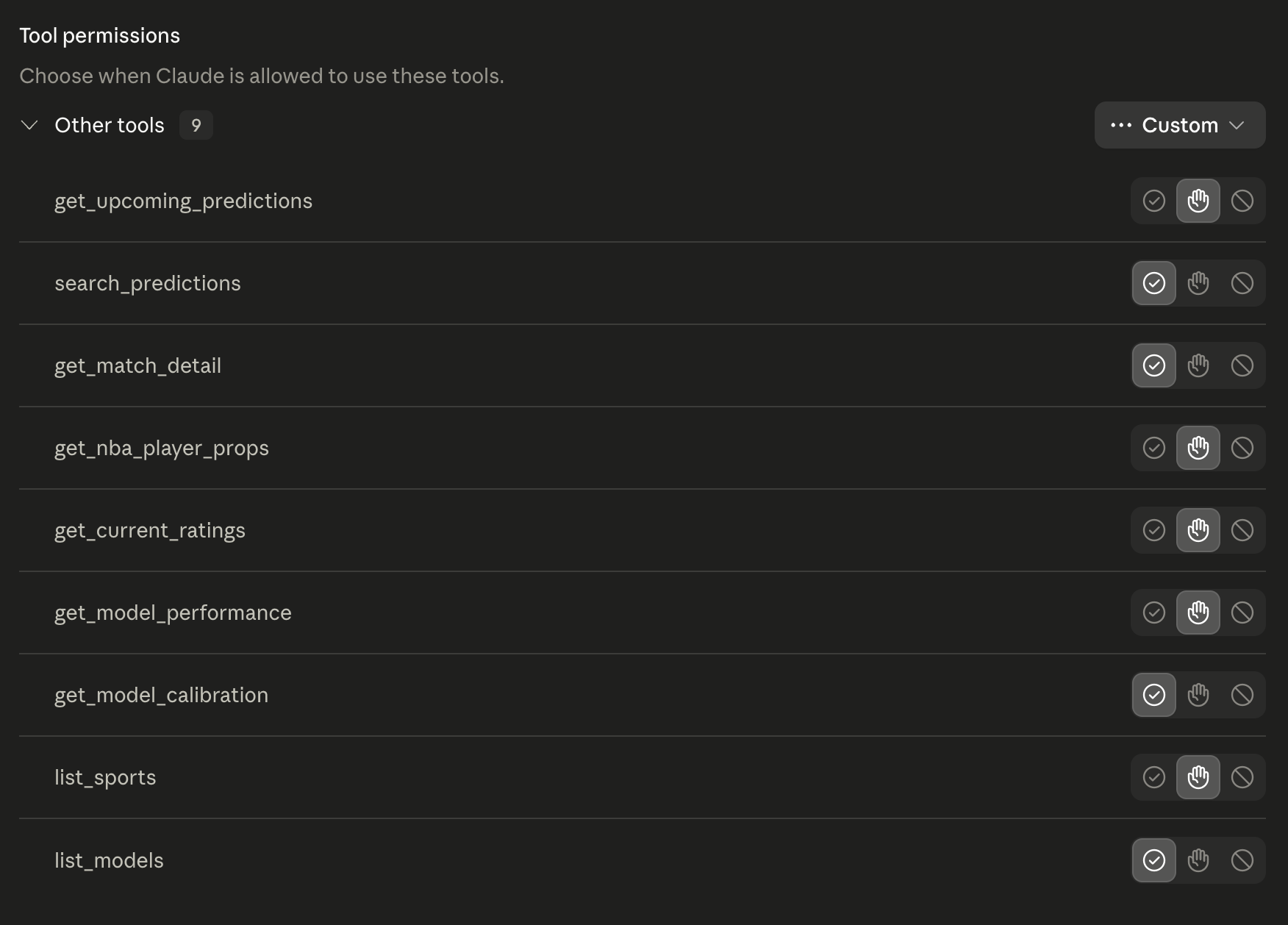
Open a new chat and ask anything in plain language. Claude surfaces the Predixsport tools in its Search and tools menu; you don't need to select them explicitly. The model picks the right one for each question.
If Claude doesn't seem to see the connector after you add it, fully quit and reopen the app or refresh the browser tab.
Also available in the ChatGPT desktop app
The same server works in the ChatGPT desktop app as a custom MCP server. You need a ChatGPT Plus plan or above, and you add it from the app's settings on your computer.
-
Open your account menu and choose Settings.
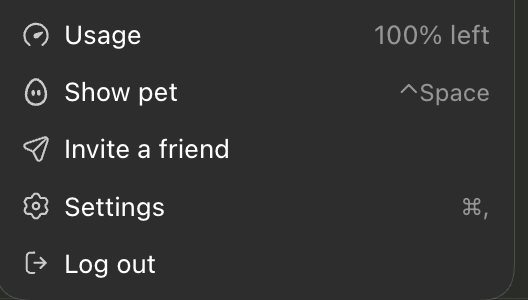
Settings lives in the account menu, bottom left. -
Go to Plugins, open the Add menu
in the top right and pick Add MCP server.
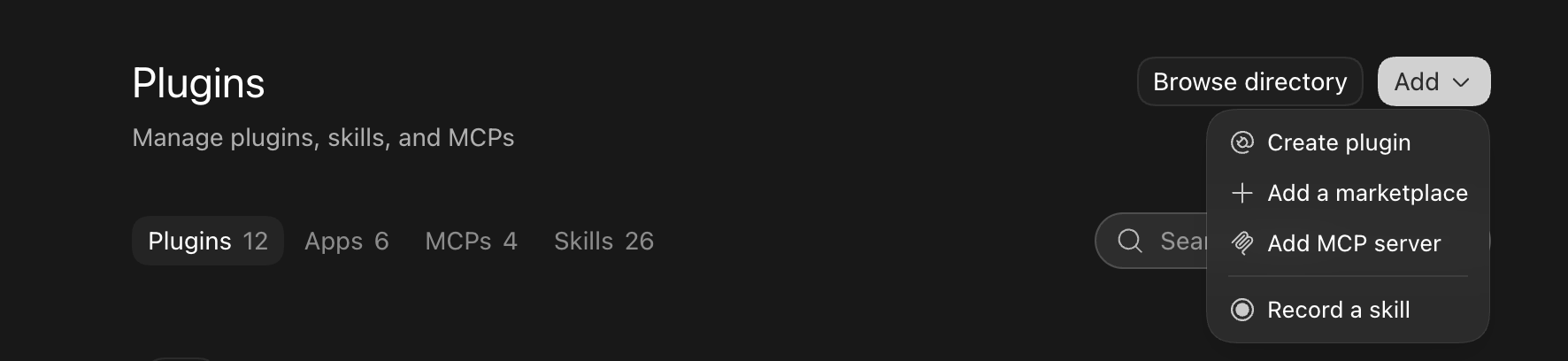
The Add menu, top right of the Plugins page. -
Name it
Predixsport, choose Streamable HTTP and set the URL tohttps://mcp.predixsport.com/mcp. Leave the token and header fields empty, you sign in with OAuth in a moment. Click Save.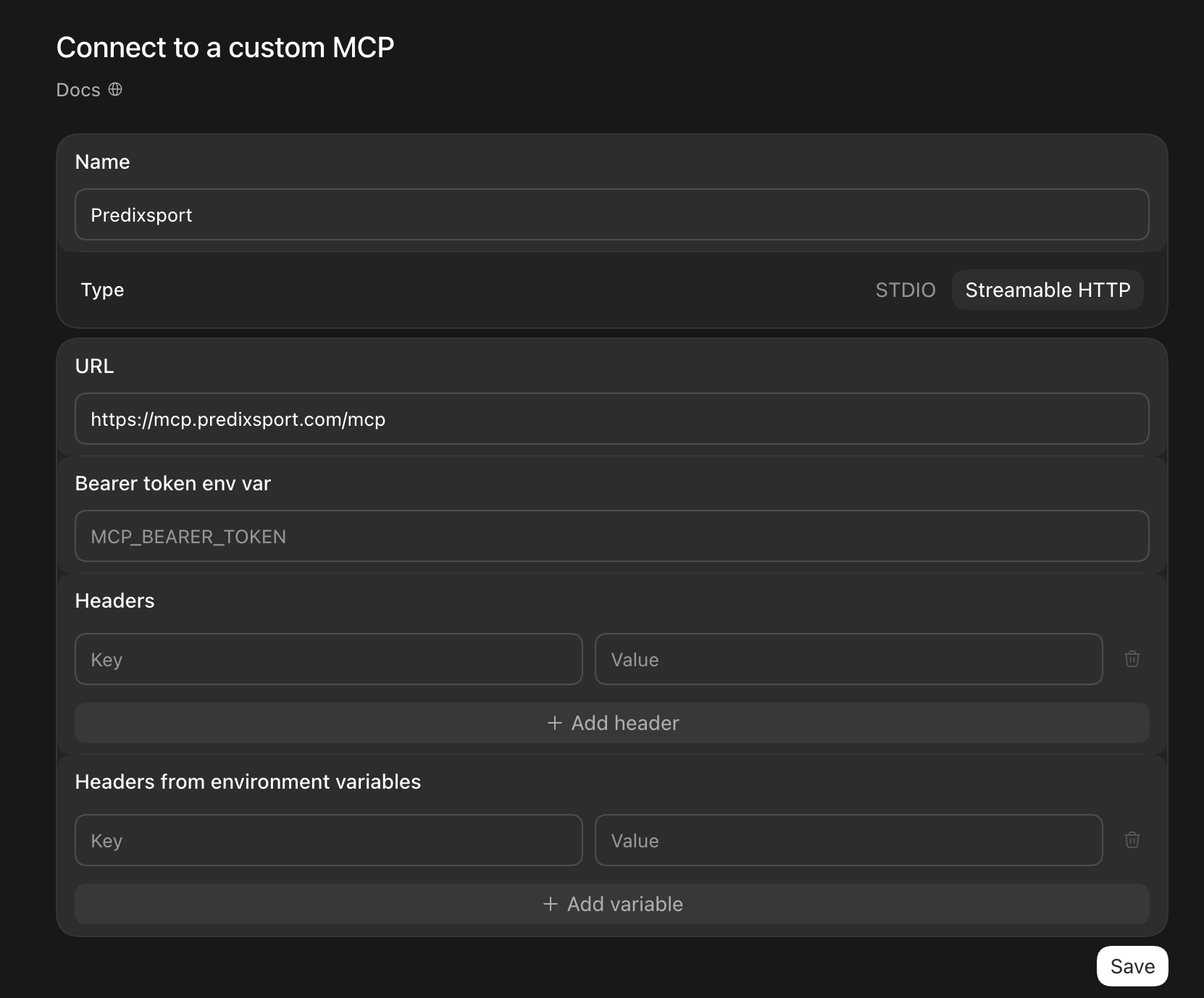
Two fields to fill: the name and the URL. Everything else stays empty. -
Back in Plugins → MCPs the server is listed
and switched on, but not connected yet. Click
Authenticate.
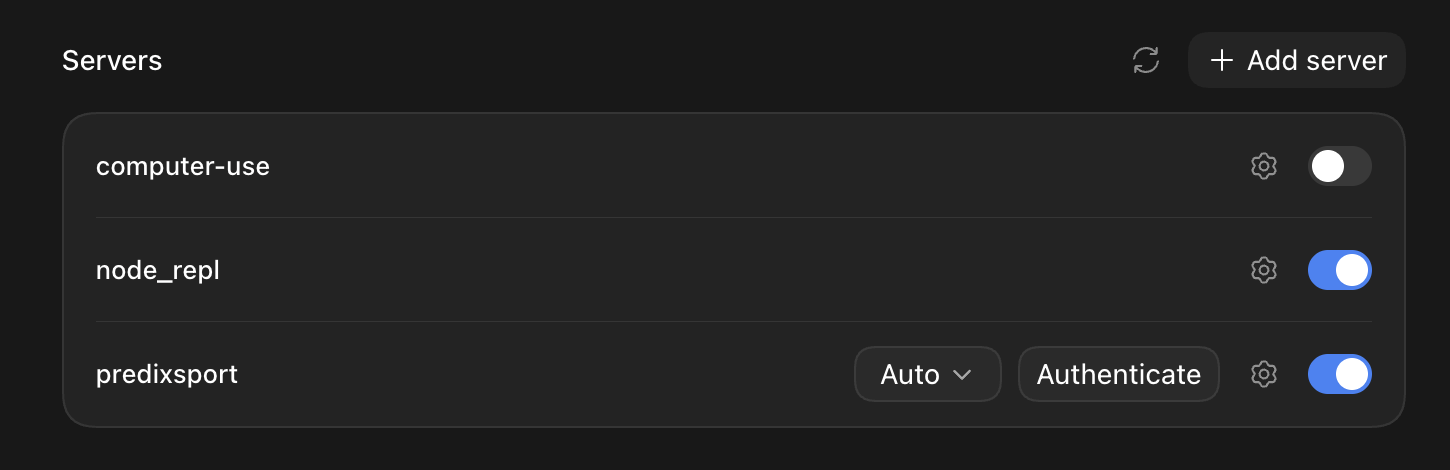
Saved is not connected. Authenticate is the step that links your Predixsport account. -
A Predixsport page opens in your browser. Sign in with Google if
asked, review the access it lists, then click
Allow Codex once. Codex is how the ChatGPT app
introduces itself to us, the name is expected. The tab may stay
open after you click, that is fine: go back to the app.
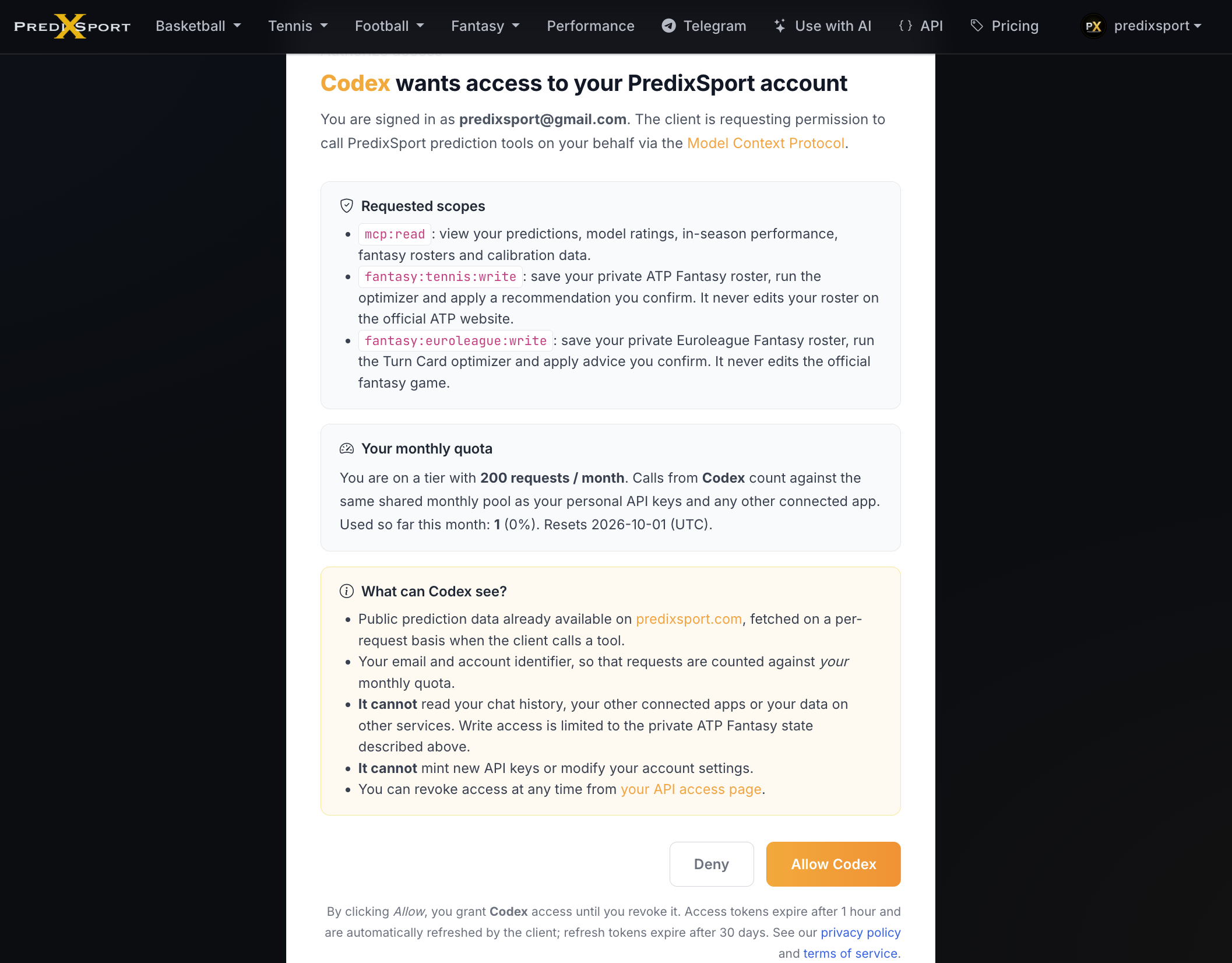
Same authorization screen as Claude and Perplexity. The Fantasy write permissions only touch your private Predixsport roster, never the official games. -
Done. Type
/mcpin the composer to see Predixsport among the connected servers, then ask your first question, for example: Using Predixsport, show the current ATP Elo top 10.
This lives in the desktop app only: ChatGPT web and mobile do not pick it up. Menu names move between app versions, the OpenAI MCP setup docs have the current ones. Your Predixsport quota is the same one the other connectors share.
Also available in Perplexity
The same Predixsport server works as a custom connector in Perplexity. You need a Perplexity Pro, Max or Enterprise plan, and you add it from the web app.
-
In the Perplexity web app open your account menu, choose
All settings → Connectors, then click
+ Add custom connector in the top right.
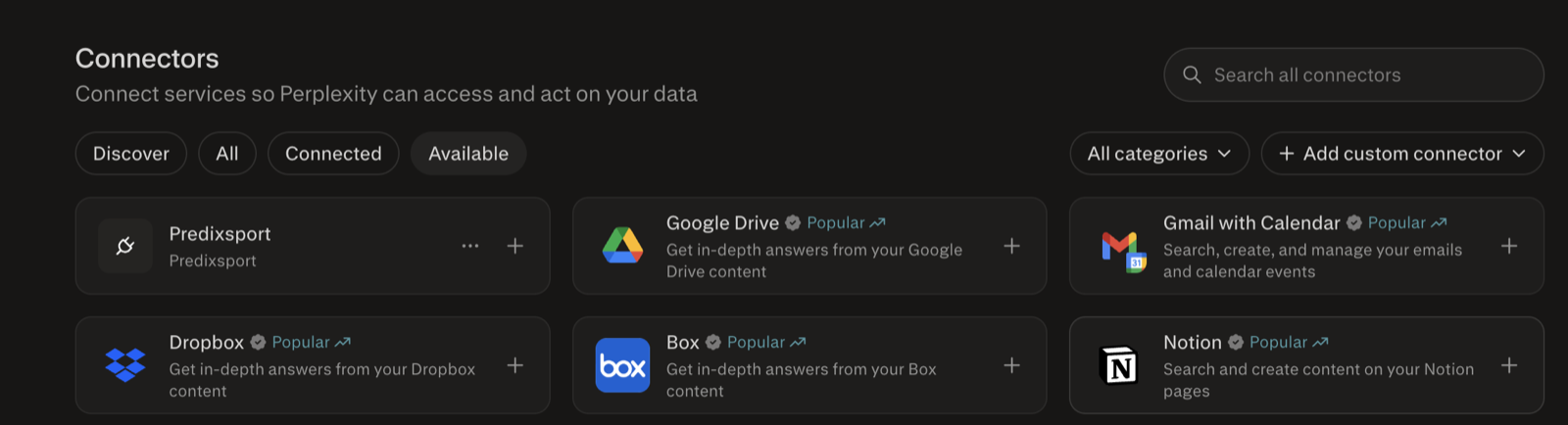
The Connectors page. The button you want is + Add custom connector, top right. -
Name it
Predixsportand set the MCP server URL tohttps://mcp.predixsport.com/mcp. The Advanced defaults are already correct (OAuth authentication with Client ID and Client Secret left empty, Streamable HTTP transport, Public network access). Tick the checkbox and click Add.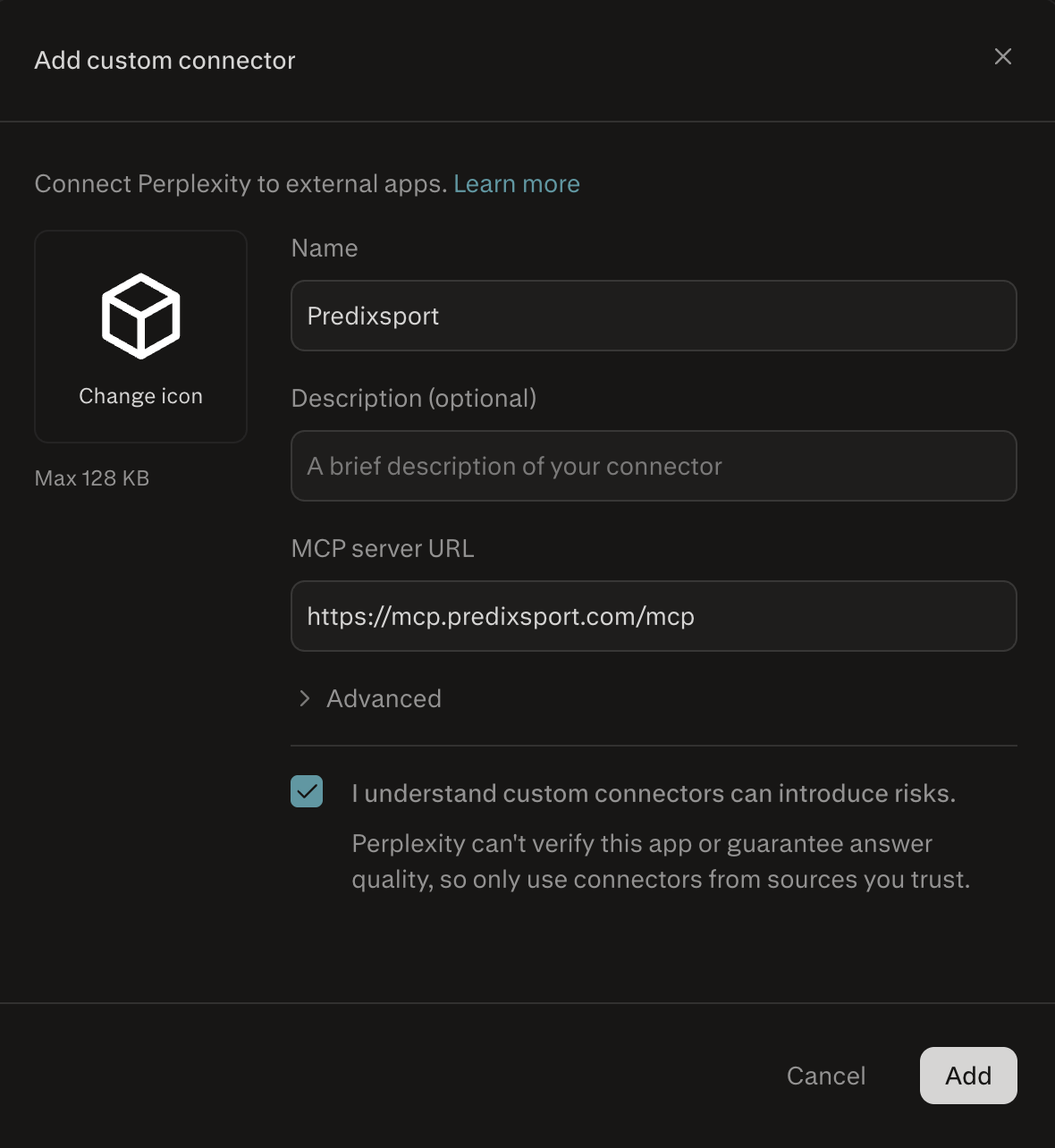
Only two fields to fill: the name and the server URL. Leave everything under Advanced as it is. -
The Predixsport card appears in your connector list. Open it and
click + Add connector at the top of the panel.
This is the step that starts the authorization, the panel itself
stays empty until you do.

The panel looks empty. That is normal: click + Add connector at the top to launch the authorization window. -
A Predixsport window opens. Sign in with Google if asked, review
what Perplexity gets access to, then click
Allow Perplexity.
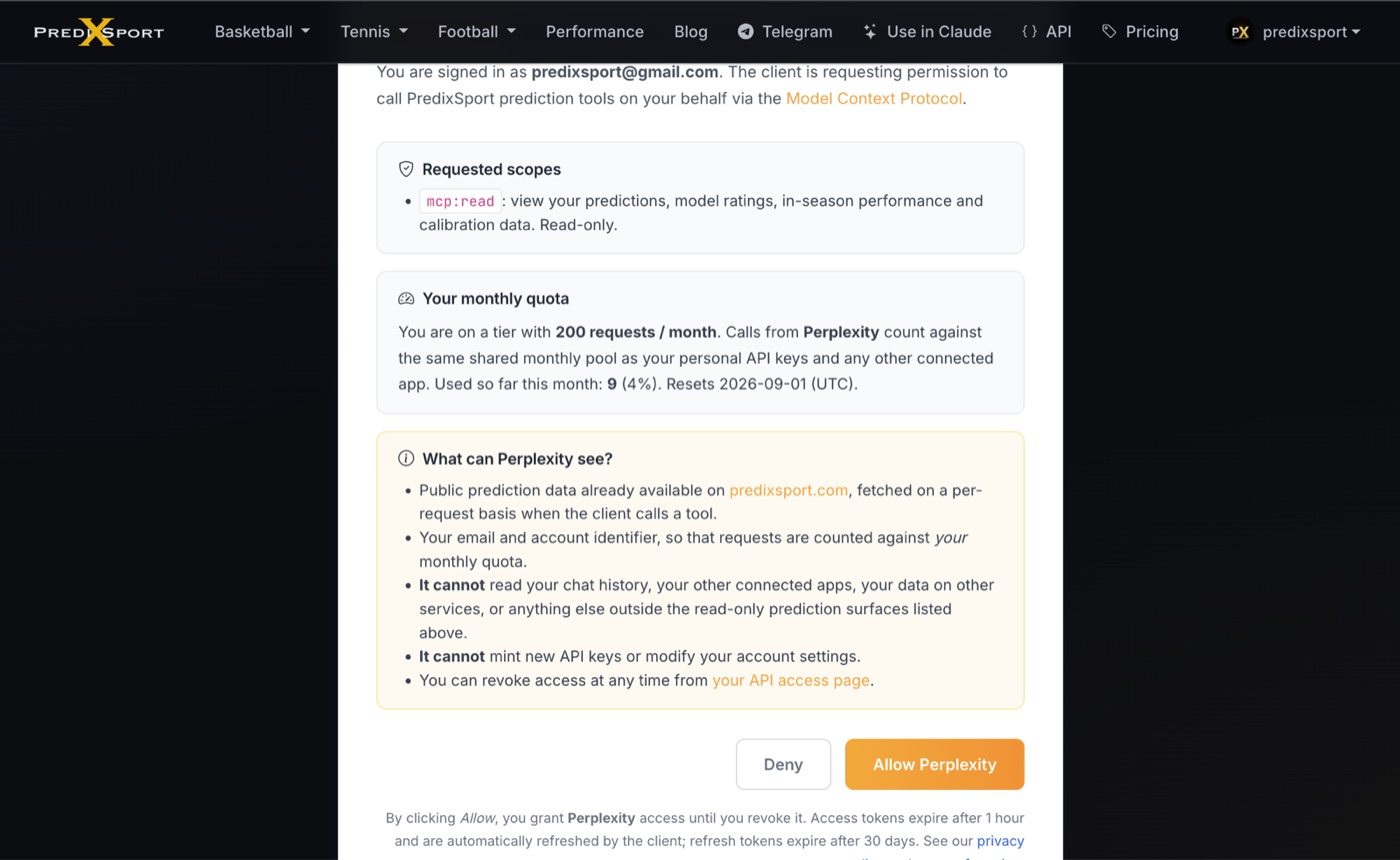
This older read-only example shows how the authorization screen lists exact access. Current connections can also request separate ATP and Euroleague Fantasy permissions. -
Done. The card now shows under Connected with a
check mark. Ask your first question and name the connector, for
example: Using the Predixsport connector, show the current
ATP Elo top 10.
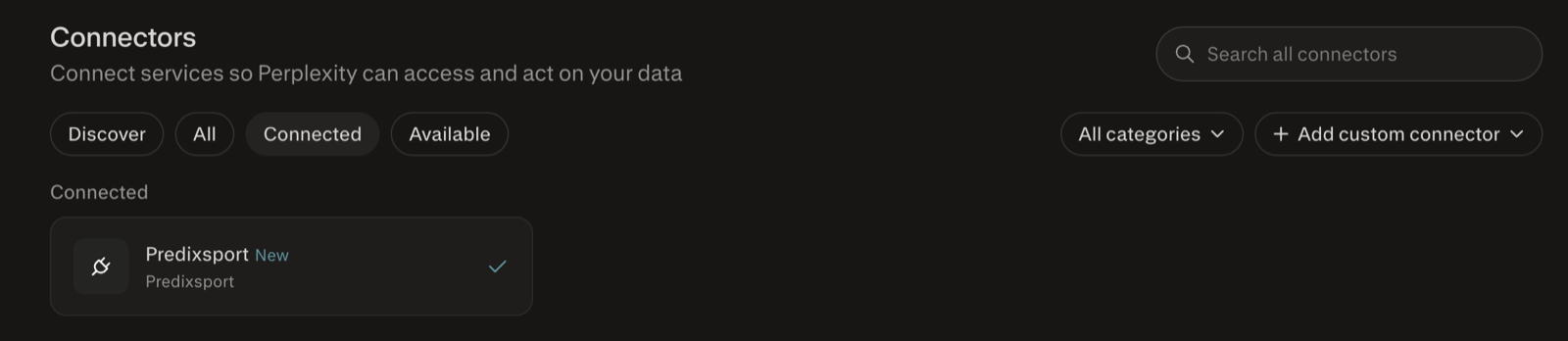
Connected. From here it also works in the Perplexity apps, the connector lives on your account.
Your Predixsport quota is the same one the Claude connector uses, so a Free account covers 200 calls a month across all of them.
What's covered today
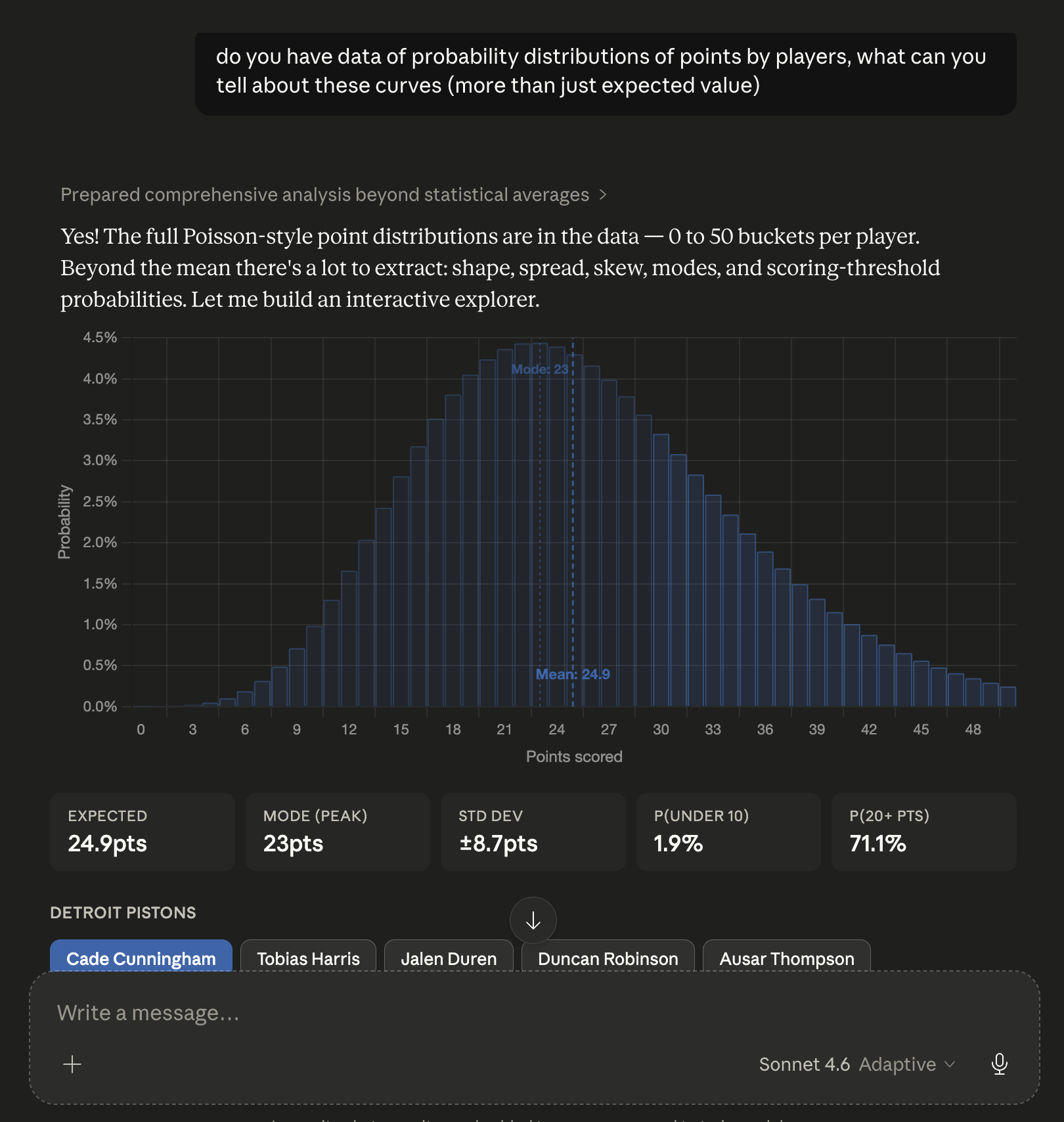
- NBA: regular season and playoffs. Match-level predictions (win probability, point spread, total points) and per-player projections (points, rebounds, assists, three-pointers made).
- Euroleague: match predictions, player PIR and box-score projections, team and player performance, ratings, season simulations and the private Fantasy Turn Card public beta.
- Football: Serie A, Premier League, La Liga, Bundesliga, Ligue 1. Match result (1X2), over/under 2.5 goals, both teams to score, expected goal spread, corners and shots.
- Tennis: ATP and WTA. Winner probability, total games, game spread, exact set score, aces and double faults projections, tiebreak likelihood, ratings and tournament simulations. ATP also includes the private Fantasy optimizer public beta.
- Champions League: season simulations and named-player distributions after official team sheets are published.
Every prediction is generated by a dedicated neural network and evaluated independently. Per-model calibration data is queryable through the connector. Ask Claude "how well-calibrated is your <model_id>?" to see the reliability curve.
Availability notes
- ChatGPT: desktop app only, through the custom MCP server. There is no Predixsport entry in the ChatGPT directory yet, so web and mobile stay out for now.
- Capability refresh: clients cache connector tools. If a new tool or Fantasy permission is missing, remove and add the connector again, then approve the updated access request.
Privacy
The connector only sees the tool calls your assistant makes on your behalf, for example "fetch upcoming NBA matches" with the relevant parameters. It does not see your full chat. Predixsport counts monthly usage tied to your account for rate limiting and abuse prevention. We do not store the content of your prompts. Private Fantasy rosters are stored in your Predixsport account so Web, REST and MCP can resume the same state.
Revoke your key at any time from the API access page. Full details in our privacy policy.
Troubleshooting
Claude doesn't see the Predixsport tools
Fully quit and restart Claude after adding the connector (Cmd+Q on macOS, the file menu's Quit on Windows; hard-reload the browser tab on the web; force-close and reopen the mobile app). Closing the window alone does not reload the connector configuration.
If after restart the tools still don't appear, open Settings → Connectors: any configuration error is displayed there alongside the entry.
The Fantasy tools are missing or read-only
Connector clients cache their tool list and existing connections are not granted new write permissions automatically. Remove the Predixsport connector, add it again and approve the sport-specific ATP or Euroleague Fantasy permission on the consent screen.
Claude returns "Invalid or expired API key"
The Predixsport connector authorizes through sign-in, not a pasted key. This message means the authorization expired or was revoked. In Claude, open Settings → Connectors, remove the Predixsport entry, then add it again and click Authorize on the screen that opens. A fresh token is issued automatically.
The connector returns 503 Service Unavailable
A transient signal that our backend is briefly busy,
typically during a daily model retrain. The
Retry-After header tells
Claude when to try again; it usually resolves in seconds. If
it persists for more than five minutes,
send us a message
via the contact form.
I don't see any NBA matches in the results
NBA predictions are gated on the expected starting five and injury reports, which are published only a few hours before tip-off. An empty result for a wide date range is the normal state during the day; predictions appear on game day. Ask Claude for the next scheduled card and it will adjust the window for you.
Tennis predictions show a date that looks old
The date field on tennis
responses is the tournament's scheduled start day, not the day
a specific match is played. A Masters event that begins on
day X has every match across all rounds tagged with date X,
even matches played a week later. The data is fresh; only
the field's meaning differs from football and basketball
conventions.
Are there usage limits?
The free tier is 200 connector requests per calendar month, shared across all your active keys. That covers a few dozen Claude conversations with heavy back-and-forth, so most people never notice it. Hit the limit and the connector replies with a clear message telling you exactly when access returns (the 1st of the next month, UTC). Drop us a line at our contact form and we'll happily lift the cap. Anthropic plans separately set overall Claude usage; their limits are at claude.com/pricing.
For developers
If you'd rather drive the predictions from your own code, the REST API powers this connector: same endpoints, same data, same rate limits. Use it for Python notebooks, dashboards, automated pipelines, or anything where you want raw JSON over HTTPS instead of a chat interface. Full reference and key management on the API access page.
Ready to start?
Add the connector, sign in when prompted and approve the access you want. There is no API key to generate or paste for the remote connection.
Start the connection ↑Questions, feedback, or stuck on setup? Send us a message . We read every reply.